Škoda MU1440 · 800×480 R7
Use the Škoda MU1440 interface on a compatible 8-inch, 800×480 centre display, with adapted menus and touch controls.
800×480 details & compatibilityKeep your compatible 8-inch display with MU1440, or bring Android Auto to the Virtual Cockpit. Choose the product that matches your setup.
Use the Škoda MU1440 interface on a compatible 8-inch, 800×480 centre display, with adapted menus and touch controls.
800×480 details & compatibilityDisplay Android Auto navigation and apps in a supported Virtual Cockpit. Select the version for your head unit firmware.
Choose an Android Auto versionKeep your 8-inch display. Use MU1440.
This adaptation lets the MU1440 interface work with a compatible 800×480 display. It adjusts the native menu layout, graphics and touch input to the screen.
Useful when upgrading to a compatible MU1440 setup for a Virtual Cockpit retrofit: you can retain the supported 8-inch display instead of replacing it for the screen resolution.
For a supported 8-inch, 800×480 centre display used with Škoda MU1440.
Native interface resources and menu layout adapted to 800×480.
Touch input aligned with the buttons and controls on the adapted screen.
The listed MU1440 firmware must already be installed. This package adapts its display interface; it is not a firmware upgrade package.
Android Auto in the Virtual Cockpit is a separate CockpitLink product with its own license. For Android Auto navigation such as Waze, choose the matching Android Auto version as well.
Choose an Android Auto versionOne vehicle activation · separate product price
70.00 EUR
Select Škoda MU1440 800×480CockpitLink brings Android Auto into supported Škoda MU1440 and Volkswagen MU1367 Virtual Cockpit systems. One purchase activates one vehicle.
Upload CockpitLink-License-Request.txt created by the car.
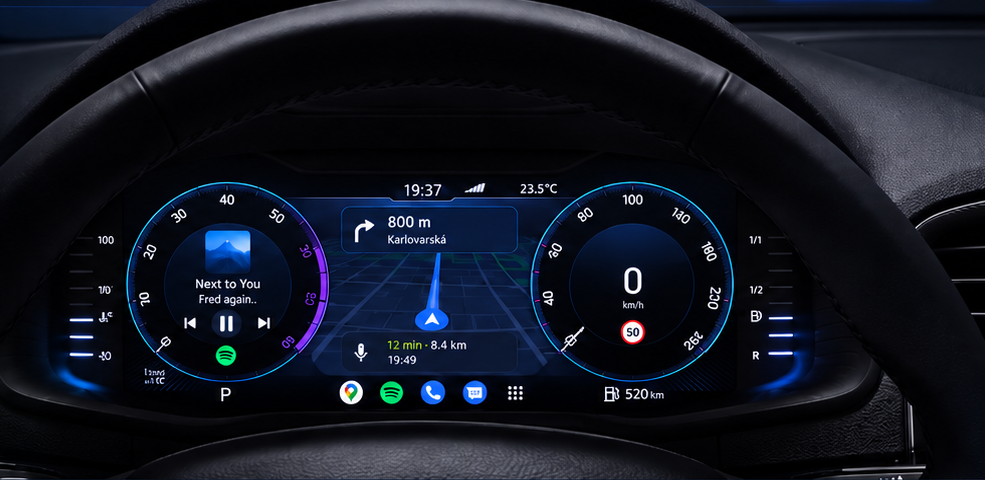
Navigation, media and key Android Auto information in the virtual cockpit.
Encrypted distribution with vehicle-bound activation.
Designed to feel native to the digital cockpit.
Built for the verified MU1440 and MU1367 firmware profiles.
Purchase, create the vehicle request, activate the license and install the protected package.
Sign in by email and complete secure checkout.
Run it once in the vehicle to create the License Request file.
Upload CockpitLink-License-Request.txt created by the car.
Install the licensed package and use Android Auto in the virtual cockpit.
MHI2_ER_SKG13_P4526 / MU1440
Android Auto and CarPlay for a factory MU1440 head unit.
70.00 EUR
Download temporarily unavailable
MHI2_ER_SKG13_P4526 / MU1440
Android Auto and CarPlay for MU1440 with R7 already installed.
70.00 EUR
Download temporarily unavailable
MHI2_ER_VWG13_P4521 / MU1367
70.00 EUR
Download temporarily unavailable
MHI2_ER_SEG11_P4709 / MU1447
1.00 EUR
Download temporarily unavailable
SEAT MU1409 / CLU8_MMX2_SE_ER_G11_137PROD
1.00 EUR
Download temporarily unavailable
PDF instructions for installation, activation and everyday use.
Prepare the SD card using the download button in My CockpitLink, then follow the vehicle steps in the PDF.